


Free Online Word Counter for Accurate Writing Analysis
A reliable word counter does more than show how many words are in a piece of text. It helps you understand content length, structure, readability, keyword use, and whether your writing fits the platform or purpose you are targeting.
This free online Word Counter gives you an instant overview of your content while you type or paste text into the editor. Use it to count words, characters, sentences, and paragraphs in real time. The tool also checks characters without spaces, estimated reading time, average sentence length, unique words, frequently used keywords, readability signals, and other useful writing metrics.
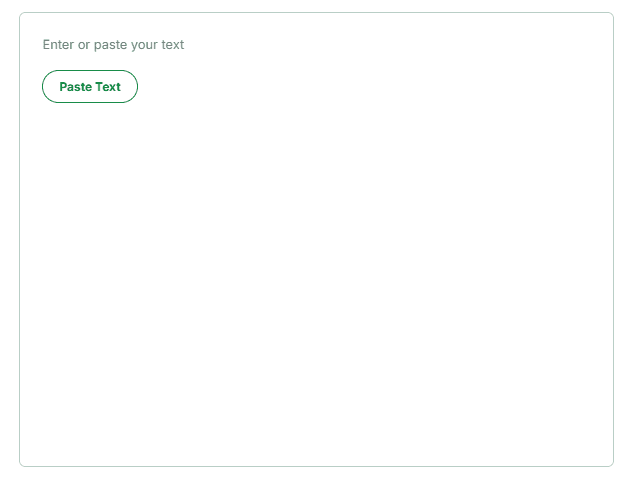
Whether you are preparing a blog post, essay, assignment, social media caption, website copy, email, product description, report, or SEO article, the dashboard gives you the numbers you need without manual counting.
There is no complicated setup. Paste your content, review the live report, make your changes, and copy the updated report when you are finished. The tool is useful for quick text-length checks, but it is also detailed enough for writers, students, marketers, editors, freelancers, and content teams that need a practical writing analysis tool.
What Is an Online Word Counter?
An online word counter is a browser-based tool that calculates the total number of words in a block of text. A basic counter only returns one number. A more useful word count tool also works as a character counter, sentence counter, paragraph counter, reading time calculator, keyword frequency checker, and readability analyzer.
Word count matters because many writing tasks have a fixed or recommended length. A school assignment may require 1,000 words. A blog article may need enough depth to answer a search query properly. A product description may need to stay concise. A social media bio or post may have a strict character limit. A freelance writer may also need an exact word total for pricing, delivery, or client approval.
Instead of estimating the length, this tool gives you a live and measurable result. As your text changes, the report updates so you can see whether you are above or below your target.
It can be used as a simple online word counter for a short paragraph or as a more complete content analysis tool for long-form writing.
What This Word Counter Checks
Total Word Count
The main metric shows the number of words in your text. This is useful for articles, blog posts, essays, reports, scripts, newsletters, landing pages, and any task that includes a minimum or maximum word requirement.
A real-time word count is especially helpful during editing. You can remove unnecessary sections, expand weak explanations, or balance different parts of a document while keeping the final length under control.
For example, when an assignment requires between 1,200 and 1,500 words, the live counter helps you stay inside that range. When writing for a client, it also helps you confirm that the final deliverable meets the agreed word count.
Character Count
The character counter calculates letters, numbers, spaces, punctuation marks, and other symbols in the text. Character count is often more important than word count for short-form content.
Social media bios, post titles, metadata, form fields, ad copy, text messages, app interface labels, and email subject lines are commonly measured by characters rather than words.
The dashboard also shows characters without spaces. This gives you a second measurement when spaces should not be included in the total. Writers, translators, developers, and form designers may need both values depending on the project.
Sentence Count
The sentence counter helps you understand how your content is structured. A high word count with very few sentences may indicate long and difficult passages. A large number of extremely short sentences may make the writing feel fragmented or mechanical.
Sentence count becomes more useful when you compare it with average sentence length. Together, these metrics can help you identify whether your writing is too dense, too repetitive, or appropriately paced for the intended audience.
This is particularly useful for blog writing, web copy, academic assignments, reports, and educational material.
Paragraph Count
The paragraph counter measures the number of paragraph breaks in your text. Paragraph structure directly affects how easy content is to scan, especially on mobile devices.
Long walls of text are difficult to read even when the ideas are valuable. For web content, blog posts, product pages, and landing pages, focused paragraphs usually create a cleaner reading experience.
The paragraph count helps you check whether your content has been divided into logical sections instead of being presented as one large block.
There is no perfect paragraph length for every type of writing. The purpose is to make sure each paragraph communicates one clear idea and remains easy to follow.
Characters Without Spaces
Some platforms and writing requirements calculate text length without including spaces. The characters-without-spaces counter gives you this value separately.
This measurement can be useful for translation work, form validation, programming tasks, publishing requirements, and projects where every visible symbol needs to be measured precisely.
Having both total characters and characters without spaces means you do not need to manually remove spaces or use a second character-counting tool.
Estimated Reading Time
The reading time calculator estimates how long an average reader may need to finish the text. This metric is useful for articles, tutorials, newsletters, reports, video scripts, presentations, and educational content.
Reading time helps both writers and readers. Writers can judge whether a piece is too short for the subject or unnecessarily long. Readers can quickly understand the level of commitment required to finish the content.
For content teams, estimated reading time can also help when planning article depth or matching written content to a video, lesson, or presentation duration.
The result is an estimate rather than an exact measurement. Actual reading speed varies depending on the reader, subject difficulty, formatting, and complexity of the language.
Grade-Level Analysis
Where enough text is available, the tool can provide a grade-level signal. This estimates the level of reading ability someone may need to understand the content comfortably.
A higher grade level is not automatically better. The appropriate level depends on the audience.
Academic and technical writing may require specialized language. General website content, product descriptions, help documentation, and blog articles often work better when the wording is clear and direct.
Use the grade-level result as a diagnostic signal, not as an absolute rule. Do not remove necessary terminology or weaken an accurate explanation only to reduce the score.
Readability Analysis
The readability checker helps identify how easy or difficult the text may be to read. It may consider factors such as sentence length, word complexity, paragraph structure, and overall writing style.
Readable content is not the same as oversimplified content. Strong writing explains ideas clearly without adding unnecessary complexity.
A readability score can help you locate sections that need editing, but it cannot fully evaluate logic, accuracy, context, or usefulness. You should still read the final content carefully and consider the real audience.
Tone-of-Voice Signals
The analysis panel may provide a tone-of-voice result when there is enough text to evaluate. Tone describes how the writing feels to the reader, such as formal, conversational, informative, confident, neutral, or promotional.
This is useful when your content must match a particular brand voice or communication goal.
A sales page may need confident and persuasive language. A customer-support article should feel calm and helpful. An academic paper should remain objective. A social media post may use a more conversational tone.
Automated tone analysis is not a replacement for human judgment. It is a supporting signal that can alert you when the writing style may not match its intended purpose.
SEO Writing Signals
For search-focused content, the tool can provide basic SEO-related feedback. This does not guarantee search rankings, and no legitimate word counter can promise that.
Search performance depends on search intent, content usefulness, competition, authority, technical SEO, backlinks, internal linking, user experience, and many other factors.
However, an SEO word counter can still help you review:
Overall content length
Keyword repetition
Frequently used terms
Sentence structure
Paragraph balance
Reading difficulty
Topic consistency
Thin or underdeveloped sections
These signals make it easier to spot an article that lacks depth, uses the same phrase excessively, or has drifted away from its main subject.
Unique Word Count
The suggestions panel shows how many unique words appear in the text. This can reveal whether your vocabulary is varied or whether you repeatedly use the same words.
A higher number of unique words does not automatically mean better writing. Unnecessary synonyms can make a simple explanation confusing.
Use this metric to detect obvious repetition. Then revise only the sentences where the repeated wording genuinely affects clarity or flow.
Average Sentence Length
Average sentence length provides a quick view of writing complexity. Very long sentences can become difficult to follow, especially when they contain several separate ideas.
On the other hand, using only very short sentences can make content feel abrupt or robotic.
Strong writing normally uses a natural mixture of shorter and longer sentences. Use the average as a warning signal rather than chasing a specific number.
When the average becomes unusually high, look for sentences that can be divided. When it becomes extremely low, check whether closely related ideas should be combined.
Top Keywords and Word Frequency
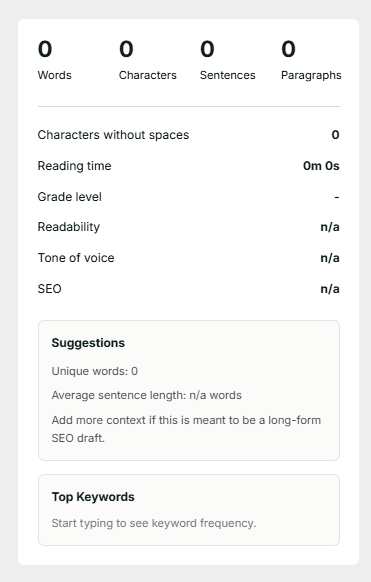
The Top Keywords section shows which words appear most frequently in your text. This works as a simple keyword frequency checker and can be useful for SEO articles, academic writing, speeches, product descriptions, and editorial review.
For SEO content, the goal is not to repeat one target keyword as many times as possible. Keyword stuffing makes content worse, damages readability, and can make the page look untrustworthy.
A stronger approach is to cover the topic naturally using:
Relevant terms
Related concepts
Questions and answers
Examples
Use cases
Supporting explanations
Closely connected entities
The keyword frequency report helps you check whether an important subject is barely mentioned or whether one phrase is being used excessively.
It can also reveal accidental repetition that is difficult to notice during normal proofreading.
Why Word Count and Character Count Matter
Different formats have different length requirements. A writer who only checks word count may still exceed a character limit. A marketer who only checks characters may fail to notice that the copy lacks enough information.
This is why a combined word and character counter is more useful than a single-purpose calculator.
Word count is normally the better measurement for long-form content, including:
Essays
Articles
Reports
Case studies
Book chapters
Newsletters
Video scripts
Academic assignments
Character count is more useful for short-form content, including:
Meta titles
Meta descriptions
Headlines
Usernames
Social media posts
Profile bios
Captions
Advertisements
Email subject lines
Form fields
Sentence and paragraph counts provide structural context. Reading time and readability provide audience context. Keyword frequency and unique word count provide editorial context.
Together, these measurements create a much more complete picture of your text.
Social Media Character Counter

The Word Counter includes visual character references for common social media and short-form content formats.
As you type, you can compare the current text length with the displayed targets for platforms and placements such as Instagram, Facebook, X, LinkedIn, and longer captions.
A social media character counter is useful when writing:
Instagram bios
Facebook posts
X posts
LinkedIn introductions
Profile descriptions
Social media captions
Promotional announcements
Personal branding content
Campaign copy
Community updates
Monitoring the character count while writing helps prevent last-minute cutting after you paste the content into another platform.
It can also improve your editing. When space is limited, every word must contribute to the message. Unnecessary introductions, repeated phrases, and filler become easier to remove.
Keep in mind that social platforms may apply different limits to different fields, content formats, or account types. Treat the displayed bars as useful writing references and verify the exact platform requirement before publishing a high-stakes campaign.
How to Use the Word Counter
Using the online Word Counter takes only a few steps.
1. Enter or Paste Your Text
Click inside the text area and begin typing. You can also select the Paste Text button to add content from your clipboard.
The tool can analyze a short sentence, social media caption, email, complete essay, or long-form article.
2. Review the Live Counts
The dashboard automatically displays the total number of words, characters, sentences, and paragraphs.
Check the characters-without-spaces value when you need a stricter or alternative text-length measurement.
3. Check Reading and Writing Signals
Review the estimated reading time, grade level, readability, tone of voice, and SEO indicators.
Some results may require a longer text sample before the tool can provide meaningful analysis. A short title or single sentence may not contain enough information for tone or readability detection.
4. Review Suggestions
Look at the number of unique words and the average sentence length. These metrics can help you identify repetitive wording, dense sentences, or text that needs restructuring.
Do not edit only to change the numbers. Read the affected content and decide whether a change genuinely improves it.
5. Analyze the Top Keywords
Review the Top Keywords section to see which terms appear most often.
For an SEO article, confirm that the content remains focused on the main topic without repeating the primary keyword unnaturally. For general writing, use the list to identify words that have been overused accidentally.
6. Compare Social Character Targets
Check the visual character indicators when preparing a bio, caption, profile description, or social media post.
Shorten or restructure the content before publishing when it exceeds the target you are working with.
7. Try a Sample
Use the Try Sample button to add example content and see how the analysis works.
This is useful when you are using the tool for the first time or want to understand how different metrics respond to a longer text sample.
8. Copy the Report
Select Copy Report to copy the available text-analysis results. You can save the report, send it to an editor, or use it during a content review.
9. Clear the Editor
Use the Clear button to remove the current text and reset the dashboard before starting a new analysis.
Who Should Use This Word Counting Tool?
Bloggers and Content Writers
Bloggers can use the online word counter to check article length, reading time, keyword repetition, sentence structure, and paragraph balance.
It is useful throughout the writing process, from the first draft to the final editorial check.
SEO Writers and Content Marketers
SEO writers can review top keywords, content length, readability, average sentence length, and overall topic focus.
The tool should support an SEO workflow, not replace keyword research, competitor analysis, fact-checking, search-intent analysis, or editorial judgment.
Students and Academic Writers
Students can check whether essays, reports, assignments, research summaries, and personal statements meet the required word limit.
Sentence and paragraph data can also help identify sections that are overly long or difficult to understand.
Always follow the specific counting rules provided by your teacher, school, university, or examination authority.
Editors and Proofreaders
Editors can use the report to locate structural problems before performing a detailed line edit.
Repeated words, unusually long sentences, oversized paragraphs, and inconsistent pacing become easier to identify when the data is visible.
Copywriters
Copywriters often work with strict limits for advertisements, headlines, email subject lines, landing pages, product descriptions, and social media content.
A combined word counter and character counter makes it easier to produce concise copy without losing the central message.
Social Media Managers
Social media managers can draft captions, bios, updates, announcements, and promotional posts while monitoring character length.
This reduces the need to rewrite content after moving it into a publishing or scheduling platform.
Freelancers and Agencies
Freelance writers can verify the final word count before delivering work to a client. Agencies can use the copied report as part of an internal quality-control process.
It can also help teams maintain more consistent content standards across multiple writers.
Website Owners and Business Teams
Website owners can review product descriptions, service pages, landing-page copy, FAQs, and promotional text before publishing.
Business teams can use it for reports, proposals, email campaigns, presentations, and internal documentation.
How to Improve Your Writing Using the Report
Start by checking whether the total length matches the purpose.
A 2,000-word article is not automatically better than a 1,000-word article. It is only better when the additional words provide useful information. Remove repetition, filler, and sections that do not help the reader.
Next, review sentence length. Break sentences that contain too many separate ideas. Combine short sentences when the writing feels fragmented.
Then check paragraph structure. Each paragraph should normally focus on one main idea. Break up large paragraphs when they become difficult to scan.
Review the top keywords to find unnatural repetition. Replace unnecessary duplicates with clearer phrasing, related terms, pronouns, or relevant examples.
Do not force synonyms into every sentence. Semantic relevance comes from covering the subject properly, not from randomly inserting keyword variations.
Use estimated reading time to judge the level of commitment required from the reader. A detailed tutorial may justify a longer reading time. A product page, announcement, or promotional message may need to communicate its main value much faster.
Check readability and grade level against the intended audience. A technical guide for experts can use specialist terminology. A general service page should not require the reader to decode unnecessarily complicated language.
Finally, read the content aloud. Automated writing analysis can identify patterns, but it cannot fully judge logic, factual accuracy, persuasion, context, or natural rhythm.
The best result comes from combining measurable data with careful human editing.
Word Counter vs. Character Counter
A word counter measures the number of words in a piece of text. A character counter measures every character, normally including letters, numbers, spaces, punctuation, and symbols.
Both measurements are useful, but they solve different problems.
Use word count for:
Essays
Articles
Reports
Chapters
Blog posts
Scripts
Assignments
Long-form content
Use character count for:
Social media posts
Profile bios
Metadata
Page titles
Descriptions
Advertisements
Form fields
Usernames
Short messages
This tool gives you both values in one place, along with sentences, paragraphs, characters without spaces, estimated reading time, and additional writing-analysis metrics.
You do not need to switch between multiple counting tools.
Related Writing Tools
After checking your content, other writing tools can help you complete the next step.
Use a URL Slug Generator to turn a page title into a clean, readable URL. Use a Lorem Ipsum Generator when you need placeholder copy for a design or layout. Use a Fancy Text Generator, Bold Text Generator, or Italic Text Generator when preparing stylized text for social platforms.
Only add related-tool links that are genuinely useful. Filling the page with unrelated internal links for SEO creates a worse experience and weakens topical focus.