Most copywriting advice picks a side.
SEO people tell you to add more words, more headings, more keyword variants. Conversion people tell you to strip everything above the fold and make the button bigger. Follow either one alone and you get a page that ranks but never sells, or a page that sells but nobody finds.
The two jobs don't fight each other. They just run in a fixed order.
Before we get started...
This guide covers money pages: service pages, product pages, category pages, and standalone landing pages. Blog posts run on a different playbook.
One thing changed the math recently. AI Overviews now sit above organic results on a large share of queries and absorb the click. A randomized field experiment run in early 2026 found that removing AI Overviews lifted outbound clicks from 0.38 to 0.61 per search, with zero-click behavior climbing from 54% to 72% when they appeared. Seer Interactive's tracking across 3,119 keywords found organic CTR on AI Overview queries fell from 1.76% to 0.61%.
Read the fine print, though. Informational queries took the hardest hit. Commercial and transactional pages held up far better, and those are exactly the pages this guide is about. Your service page sits on safer ground than your blog. That's a reason to write money pages properly, not a reason to panic.
1. Pick the page and name its one job
Decide which page you're writing and what single action it should produce. Do this before you open a doc.
A page with two jobs does neither well. Benchmark data on landing pages consistently shows that pages with one clear call to action outperform pages running competing CTAs, and the gap is not small.
Here's what breaking this rule looks like. A "web design services" page that sells design work, recruits designers, and pushes the newsletter has three audiences reading three different pages. Each one gets a worse version.
To fix it:
- Write the page's job in one sentence: "Get a qualified [buyer] to book a [action]."
- Name the one keyword this page should rank for.
- Check that those two line up. If searchers for that keyword aren't ready to take that action, you need two pages.
- Move every secondary CTA to the footer or nav.
One caveat. Category and product pages carry a browse action alongside a buy action, and that's normal. The rule is one primary action per page, not one link.
2. Match search intent before you write a line
The format of the top-ranking results tells you what page type Google will rank for that query. Fight it and good copy won't save you.
Google has already tested what searchers click. The SERP is the answer key, published in advance and updated for free.
Look at "project management software." The top results skew toward listicles and comparison posts, not vendor pages.
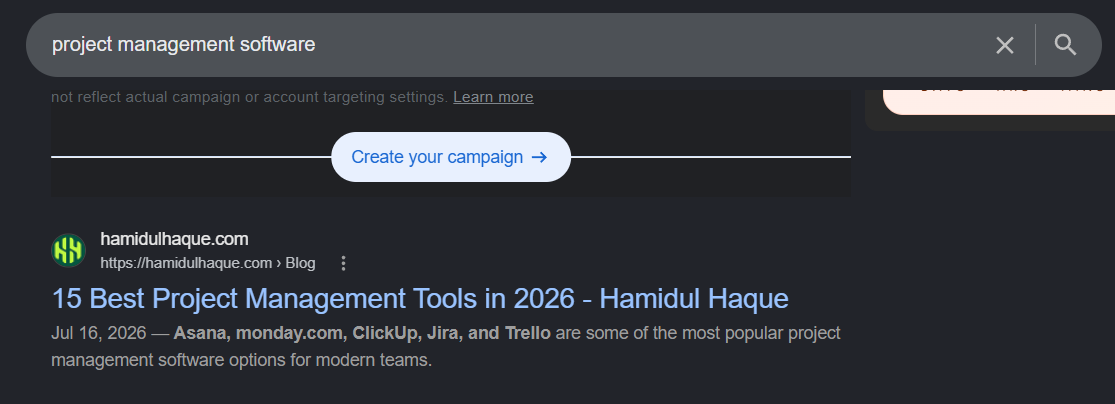
Now search "asana pricing." Pricing pages, straight down the list. Same product category, two completely different page types, because the buyer is at a different point in the decision.
Before writing, check four things on the top 10:
- Type. Blog post, product page, category page, free tool, comparison?
- Format. Listicle, how-to, spec sheet, calculator, template?
- Angle. What promise repeats across the titles? Free, fast, for beginners, current year?
- Depth. How far down the funnel? Compare the primary CTA on the top three results.
Mixed SERPs are real. When the top 10 splits evenly between blog posts and product pages, the query carries split intent and either format can rank. In that case, pick the type that matches your business goal, not the type that looks easier to write.
3. Steal the words your customers already use
Strong copy is collected, not invented.
You describe your product in your vocabulary. Buyers search in theirs. When those two drift apart, you end up ranking for terms nobody types and writing copy that never sounds like it's about the reader.
Software companies write "streamline your workflow." Their customers write "I'm sick of chasing five people for a status update." One of those is a keyword. The other is a headline, and it took zero creativity to produce.
Mine these five sources:
- Sales call recordings. Search transcripts for "the problem is" and "what I really need."
- Support tickets and churn reasons. Complaints name the failure state in plain language.
- Review sites like G2, Capterra, or Amazon. Three-star reviews carry the most honest detail.
- Reddit and niche forums where people describe the problem before they know your category exists.
- Search Console query data for pages you already own.
Watch the line between voice and keyword. Customer phrasing belongs in body copy, subheads, and FAQ questions. Your H1 and main H2s still need to carry the term people search, so use both where they fit naturally.
4. Write the hero in three lines
The area above the fold answers three questions: what is this, who is it for, what do I do next.
Visitors scan before they read. If those three answers aren't visible without scrolling, they leave and you never find out why.
Compare two versions of the same headline:
"Innovative Digital Solutions for Modern Businesses"
"Web Design That Turns Traffic Into Booked Calls"
The second names an outcome, carries the keyword, and reads like a person wrote it. The first could sit on any B2B site in any industry, which is the tell.
Build the hero in this order:
- H1: outcome first, keyword woven in.
- Subhead: who it's for and how it works, one sentence.
- CTA: the action, phrased the way the visitor would say it.
- Proof strip: one number, one logo row, or one line of social proof.
Clever headlines work for brands people already know. Stripe can write "Financial infrastructure for the internet" because you arrived knowing what Stripe does. Search traffic arrives cold, and cold readers pick clarity over cleverness every time.
5. Structure the body around objections, not features
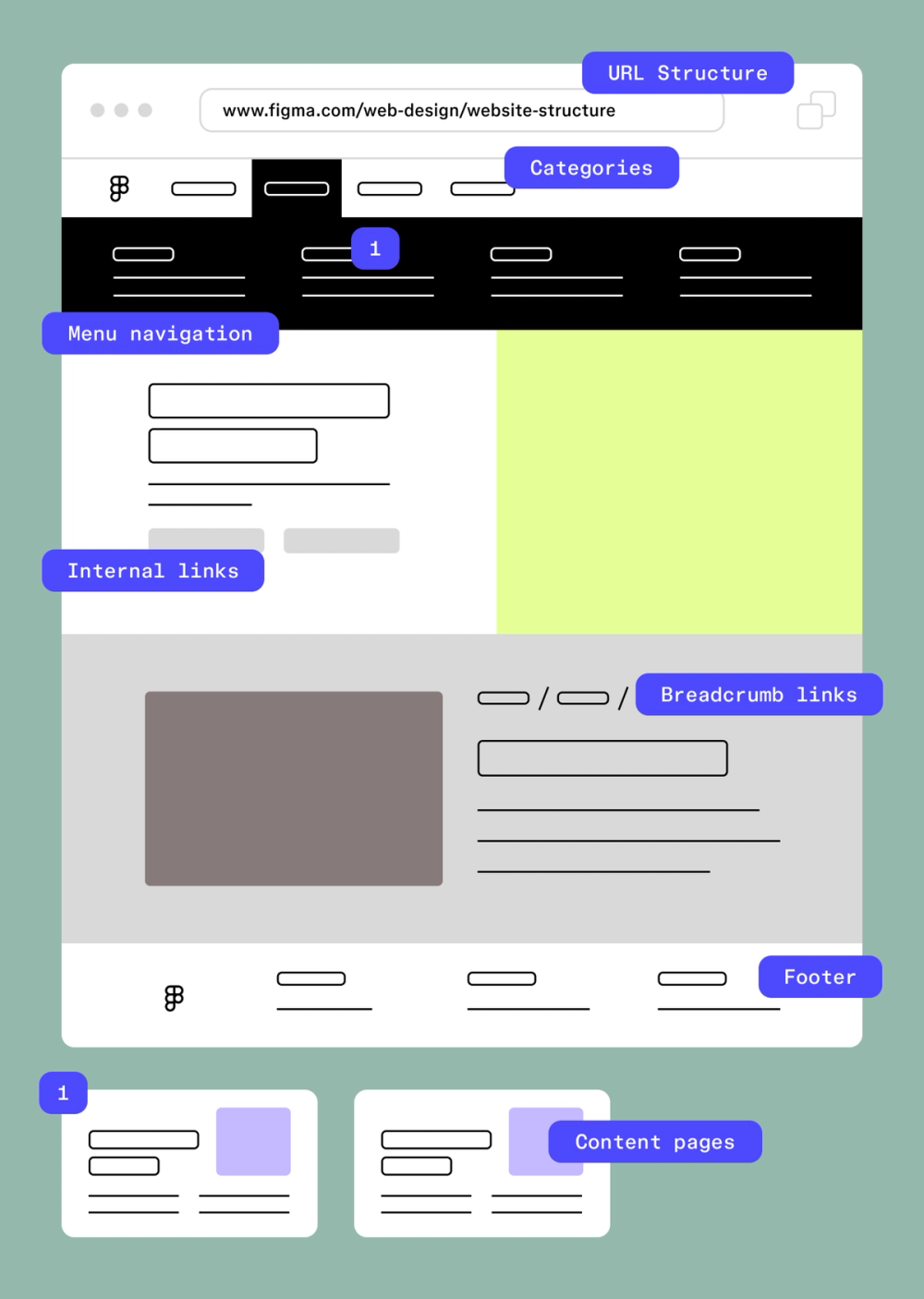
Order your sections by the questions a buyer asks, in the order they ask them.
Visitors scroll until a question goes unanswered, then they bounce. Feature lists answer "what does it do." They never touch "will this work for my situation" or "what happens if it doesn't."
Credit: Figma
Most B2B service pages get this backwards. They run four sections titled Discovery, Design, Development, Delivery. That's your internal process. The buyer wants to know whether you've handled a situation like theirs, how long it takes, what it costs, who else you did it for, and what happens when it goes sideways.
The sequence that works:
- The problem, named in their words
- What you do about it
- Proof it worked
- How it works, in process terms, now that they care
- Who it's for and who it isn't
- Price or price range
- Objection handling and FAQ
- Final CTA
To build it, list every question your sales team fields, sort by when it comes up in the conversation, and turn each one into a section or an FAQ entry. Any section that doesn't answer a real question gets cut.
Ecommerce product pages compress all of this. Specs, shipping terms, return policy, and reviews do the same work in a fraction of the space. The sequence holds; the sections just get shorter.
6. Prove every claim
Every unproven claim costs credibility with readers, and unproven claims are also the ones AI systems skip when they pick what to cite.
That second point now carries weight. Seer's April 2026 data found brands cited inside AI Overviews earn roughly 120% more organic clicks per impression than uncited brands. Vague copy doesn't get quoted. Specific, attributable copy does.
Proof runs on a scale, weakest to strongest:
- Adjectives ("industry-leading") carry no information
- Round numbers ("thousands of customers") carry almost none
- Specific numbers with a source and date
- Named customers with named results
- Third-party data the reader can go verify
The difference in practice:
Weak: "Our clients see significant growth."
Strong: "We cut checkout abandonment from 71% to 58% for Northline in 90 days."
Work through your page and highlight every claim. Next to each one, write the evidence. Where there is none, either cut the claim or go get the evidence. Attribute external stats with the source name and year, and put your own numbers in the body copy, not just buried in a testimonial block.
Never invent precision to fill the gap. A fabricated "37% increase" is worse than admitting you don't have the data yet, because one number a reader can disprove takes the rest of the page down with it.
7. Write headings that answer instead of tease
Each H2 should state the conclusion, not preview the topic.
Two audiences read your headings and skip most of the body: human scanners, and the systems that extract answers for AI results. "Pricing" tells neither of them anything. "Plans start at $49/month with no setup fee" tells both everything.
Ranking still feeds this. Analysis of AI Overview citations found the majority trace back to pages in the top 20 organic results, so position work isn't wasted. But extraction needs a self-contained answer sitting right under a heading that promises it.
Rewrite headings like this:
Tease: "Our Approach"
Answer: "We ship a working page in three weeks, not three months"
Four rules keep this consistent:
- Rewrite every body H2 as a complete statement
- Put the direct answer in the first two sentences below it
- Hold one idea per H2
- Use H3s for sub-answers, not decoration
Your H1 is the exception. It sells the outcome and sets the frame. Body headings do the answering.
8. Write one CTA and repeat it
Pick one action, write it once, and reuse the exact wording everywhere it appears.
Rotating CTA text feels like variety to the writer. To the reader, three different phrasings read as three different offers, and choosing between offers takes effort most visitors won't spend.
Form length is where this gets measurable. Unbounce's 2026 benchmark data puts three-field forms at 10.1% conversion and nine-field forms at 3.6%, with the steepest drop happening between four and seven fields. Every field you add past four costs you real submissions.
Tighten the CTA this way:
- Write it from the visitor's side. "Book my audit" beats "Submit."
- Name the time cost. "Book a 20-minute call" removes the fear of a 60-minute pitch.
- Cut form fields down to what sales actually uses. Ask the rest on the call.
- Repeat the same CTA after the hero, after the proof section, and at the close.
Long, expensive purchases need a low-commitment fallback like a spec sheet or pricing PDF. Keep it visually smaller than the primary. One primary, one fallback, no third.
9. Add on-page SEO last
Optimize after the copy works, not while you're writing it.
Writing toward a keyword target produces stiff copy that ranks and then converts at 1%. Writing for a person first, then fitting the keyword, produces copy that does both jobs. The order matters because the first version is much harder to repair than it is to redo.
Run the checklist once the draft reads well:
- Title tag: keyword first, benefit second, roughly 60 characters
- Meta description: state the offer and the differentiator, 120 to 160 characters
- URL: short, includes the keyword, no dates or IDs
- H1: one per page, carries the primary keyword
- Internal links: link to this page from related pages using anchor text that matches the target keyword
- Image alt text: describe what's in the image, skip the stuffing
- Schema: Service, Product, or LocalBusiness, plus FAQPage where an FAQ exists
Treat on-page SEO as a tiebreaker, not a lever. If your page loses on intent match or site authority, no title tag rewrite closes that gap.
10. Measure rankings and conversions separately
Track position, click-through rate, and conversion rate as three separate numbers. Blend them and you lose the diagnosis.
Three different failures look identical in a traffic dashboard:
- Position is low, so the problem is SEO
- Position is high but CTR is low, so the problem is your title and meta, or an AI Overview is taking the click
- Traffic is healthy but conversion is low, so the problem is the copy
Be skeptical of published benchmarks while you're at it. Unbounce's dataset of 41,000 landing pages and 464 million visitors puts the cross-industry median near 6.6%. WordStream's data lands closer to 2.35%. Other 2026 roundups report 4.02% or 10.76%. That spread isn't sloppy research. The studies count different conversion actions, and an email opt-in has nothing in common with a demo request. Benchmark against your own last quarter instead.
Worth noting: only around 17% of marketers A/B test their landing pages at all, which means the bar for beating your competition is lower than the benchmark articles suggest.
Set it up like this:
- Filter Search Console to the single page URL, track average position and CTR
- Track conversion rate for that page split by traffic source
- Compare against your own 90-day baseline, not an industry median
- Change one element at a time: headline, then proof, then CTA
Pages under a few hundred conversions a month can't be A/B tested honestly. At that volume, run sequential changes, give each one a full cycle, and accept that some of the movement is noise.
Final thoughts
The order does most of the work here. Job, then intent, then customer language, then structure, then proof, then SEO. Teams that reverse it end up rewriting the same page four times and blaming the algorithm.
Open your highest-value money page and run step 6 on it right now. Highlight every claim, write the evidence beside it, and delete whatever has none. That one pass usually cuts a third of the copy and makes the rest believable, which is the cheapest conversion lift available to you this week.


 Hamidul Haque
 Aug 15, 2026